

Table of Contents
- What to Look for in Apartment Security Systems
- Best No-Contract Home Security Systems for Renters
- Quick Comparison Table
- DIY Apartment Security Installation: What You Need to Know
- Home Security Systems Without Monthly Fees
- Apartment-Specific Considerations: Lease, WiFi, and Pets
- Conclusion
Last Updated: August 21, 2026
What to Look for in Apartment Security Systems
Renters face unique constraints: no drilling into walls, no permanent changes, and no risking your security deposit. Wireless, no-drilling options are essential. The best apartment security systems are designed for renters first, expand without professional installation, integrate with your phone, and don't lock you into long-term contracts.
Pay attention to monitoring options. Some let you watch everything through an app. Others offer 24/7 professional monitoring. Some provide both, letting you switch as needs change. For renters on tight budgets, flexibility matters more than having every feature.
Motion detection deserves careful consideration. Standard sensors trigger false alarms from pets, ceiling fans, or sunlight. The best systems offer pet-immune settings or activity zones that ignore specific areas. If you have animals, this is essential.
Finally, check compatibility with your existing smart home devices. Does it work with Alexa, Google Home, or Apple HomeKit? A system that integrates smoothly with what you already own saves money and frustration.
Best No-Contract Home Security Systems for Renters
"No-contract" means month-to-month payments with no long-term commitment. For renters, this is non-negotiable. Your lease might end in 8 months, you shouldn't pay for monitoring for 3 years after you move.
1. Ring Alarm Security Kit: Expandable DIY Protection
Ring's 5-piece kit includes a base station, keypad, contact sensor, motion detector, and range extender. Installation takes under an hour with no drilling. The base station sits on a shelf and connects to Wi-Fi. Sensors stick to doors and windows with adhesive strips.
The real value is expandability. Add more sensors, detectors, keypads, and cameras without replacing the core system. Each piece works independently, so you take everything with you when you move.
Ring offers optional professional monitoring through their Protect plan on a month-to-month basis. Without monitoring, you still get push notifications and two-way audio through the app.
One important limitation: cellular backup requires a paid subscription. Without it, your monitoring depends entirely on Wi-Fi. If your internet goes down, so does remote access.
Pros:
- Affordable equipment bundles
- No long-term contracts for monitoring
- Easy DIY installation without landlord involvement
- Strong Alexa integration
- Expandable with additional sensors
Cons:
- Cellular backup requires paid subscription
- Limited smart home automation beyond security
- Monitoring features require additional subscription
2. Wyze Home Monitoring: Budget-Friendly Professional Monitoring
Wyze offers professional monitoring for $9.99 per month or $99.99 per year, the cheapest 24/7 monitoring available (wyze.com). You need their Sense Hub, which bundles the base station, keypad, and entry sensors.
Setup takes 15 minutes. Stick sensors on doors and windows, plug in the hub, and connect to Wi-Fi. The app guides you through arming and disarming. If you're already using Wyze cameras, the monitoring subscription includes Cam Plus Lite, adding cloud video storage and person detection across your setup.
Professional monitoring comes through Noonlight. When you trigger an alarm, a trained operator calls you. If you confirm it's real, they dispatch police. No middleman delays.
Pros:
- Extremely affordable professional monitoring
- Seamless integration with Wyze cameras
- Includes Cam Plus Lite with monitoring subscription
- Easy setup for renters
- No-contract flexibility
Cons:
- Requires Wyze Sense system for monitoring
- Advanced features lag behind competitors
- Professional monitoring requires subscription
3. Abode Security Kit: Flexible Self-Monitoring or Professional
Abode gives you genuine choice: free self-monitoring through the app or professional monitoring for $8.49 per month or $79.99 per year. No contract either way.
The kit includes a Security Hub, one door/window sensor, and a key fob. Installation is standard stick-and-place. Nothing permanent.
Abode stands out for smart home compatibility. It works with Zigbee, Z-Wave, Google Home, Alexa, and Apple HomeKit. If you have existing smart home devices, Abode integrates cleanly instead of forcing you into a walled garden.
The free self-monitoring tier is genuine. You get app notifications, push alerts, and remote arm/disarm. Most competitors lock these features behind a subscription.
Pros:
- Excellent smart home integration with multiple platforms
- Genuinely free self-monitoring tier with app control
- No contracts for any monitoring plan
- Affordable professional monitoring when needed
- Flexible, expandable system
Cons:
- Limited camera options compared to competitors
- Best results with third-party smart home equipment
- Professional monitoring requires subscription for 24/7 response
4. SimpliSafe: Reliable No-Contract Monitoring
SimpliSafe offers well-designed equipment and reliable monitoring with no long-term contracts. Month-to-month monitoring, cancel anytime.
Equipment packages start with a base station, keypad, and sensors. Installation is DIY. Professional monitoring starts at $22.99 per month with options for video verification and intruder intervention. All plans are month-to-month.
The system works without a subscription if you want self-monitoring. You get app notifications and remote control, but no 24/7 monitoring.
Pros:
- Affordable, well-designed hardware
- No monitoring contracts required
- Multiple monitoring options including video verification
- Easy DIY installation
- Reliable 24/7 professional monitoring
Cons:
- Free self-monitoring tier is very limited
- Lacks native Apple HomeKit, Z-Wave, and Zigbee integration
- Monthly monitoring costs more than budget alternatives
5. Arlo Essential Video Doorbell: Wire-Free Entry Protection
This is not a full security system, it's a video doorbell designed for renters. Battery-powered with no wiring or drilling required. The rechargeable battery lasts months between charges.
The 2K video quality shows visitors in clear detail with a 180-degree field of view (arlo.com). Two-way audio lets you speak with visitors. AI-powered smart alerts distinguish between people, vehicles, and packages, reducing false notifications.
Installation takes minutes. Stick it on your door frame with adhesive. Connect to Wi-Fi. When you move, peel it off and take it with you.

Pros:
- Excellent 2K video quality with wide field of view
- Wire-free, battery-powered installation for renters
- Smart alerts reduce false notifications
- Two-way audio for visitor communication
- Remote siren trigger for added security
Cons:
- Advanced features require Arlo Secure subscription
- Larger than some competitors due to rechargeable battery
- Works best as part of a larger system
Quick Comparison Table
| System | Starting Price | No-Contract Monitoring | Best For | Key Differentiator |
|---|---|---|---|---|
| Ring Alarm | $199.99 | Yes | DIY expandability | Alexa integration, modular design |
| Wyze Home | $111.98 | Yes ($9.99/mo) | Budget monitoring | Cheapest professional monitoring |
| Abode | $75-$150 | Yes, free tier | Smart home integration | Free self-monitoring, HomeKit compatible |
| SimpliSafe | $250.96 | Yes ($22.99+/mo) | Reliable monitoring | Video verification, intruder intervention options |
| Arlo Doorbell | $79.99 | N/A | Entry security only | Wire-free, 2K video, no installation |
DIY Apartment Security Installation: What You Need to Know
Most apartment-friendly systems are designed for renters with no technical experience. Start by identifying entry points: front door, back door, ground-level windows. Place contact sensors here. Motion detectors go in main living areas like hallways and living rooms. Avoid pointing them directly at windows where sunlight might trigger false alarms.
Mount motion detectors 6 to 8 feet high on walls for a clear room view (the CDC). The base station sits in a central location with good Wi-Fi signal. Plug it in and connect through the app, the app guides you through this.
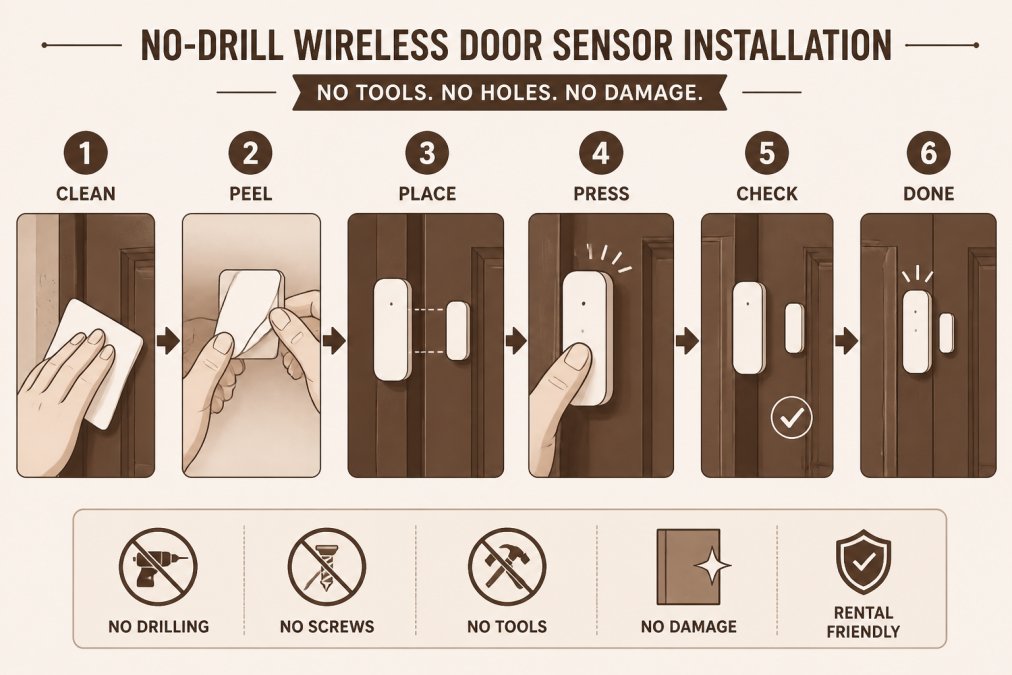
Sensor placement uses adhesive strips. Peel and stick the sensor to the door or window frame, and the magnet to the door or window itself. When the door opens, the magnet separates and triggers an alert. Test each sensor after installation by opening doors and windows to confirm alerts appear in the app.
Wireless systems communicate through Wi-Fi or proprietary radio frequencies. Wi-Fi-based systems depend on your internet connection. Proprietary radio systems work independently but may have limited range in large apartments or buildings with thick walls.
For renters in shared buildings, Wi-Fi congestion can slow things down. If your system struggles with connectivity, move the hub closer to your router or consider a Wi-Fi extender.
Tell your landlord about the system. Most leases allow security systems as long as they don't damage the unit. Adhesive sensors don't damage anything, but checking your lease first avoids headaches.
Home Security Systems Without Monthly Fees
Not every renter wants professional monitoring. You can use most systems without paying monthly.
Ring Alarm works without a subscription. You get app notifications, remote arm/disarm, and two-way audio at no cost. The catch is cellular backup requires a subscription. For apartment dwellers with reliable internet, this trade-off is acceptable.
Abode's free tier is the most generous. Full app control, push notifications, and remote access with no monthly fee and no time limit. Many users stick with the free tier indefinitely.
TP-Link Kasa Spot KC100 is a budget indoor camera under $30 that records locally to a microSD card. You can watch live video through the app with no subscription. Cloud storage requires a paid subscription, but local recording is free.
The trade-off with free monitoring is clear: you're responsible for responding to alerts. A break-in at 2 a.m. means you wake up, check the camera, and decide whether to call police. Professional monitoring means a trained operator handles that decision.
For many apartment dwellers, especially in lower-crime neighborhoods, self-monitoring is sufficient. You know what's happening at your doors and windows and handle the response yourself.
Apartment-Specific Considerations: Lease, WiFi, and Pets
Check your lease first. Most landlords allow security systems as long as they don't damage the unit. Wireless systems with adhesive sensors don't violate this. Some leases mention alarms, usually referring to traditional hardwired systems. Wireless security systems are different, you own and control them. Still, checking avoids surprises when you move out.
Shared Wi-Fi networks in apartment buildings create security considerations. If your system connects to the building's Wi-Fi, other residents technically share the same network. Use a strong password on your Wi-Fi network and enable two-factor authentication on your security app.
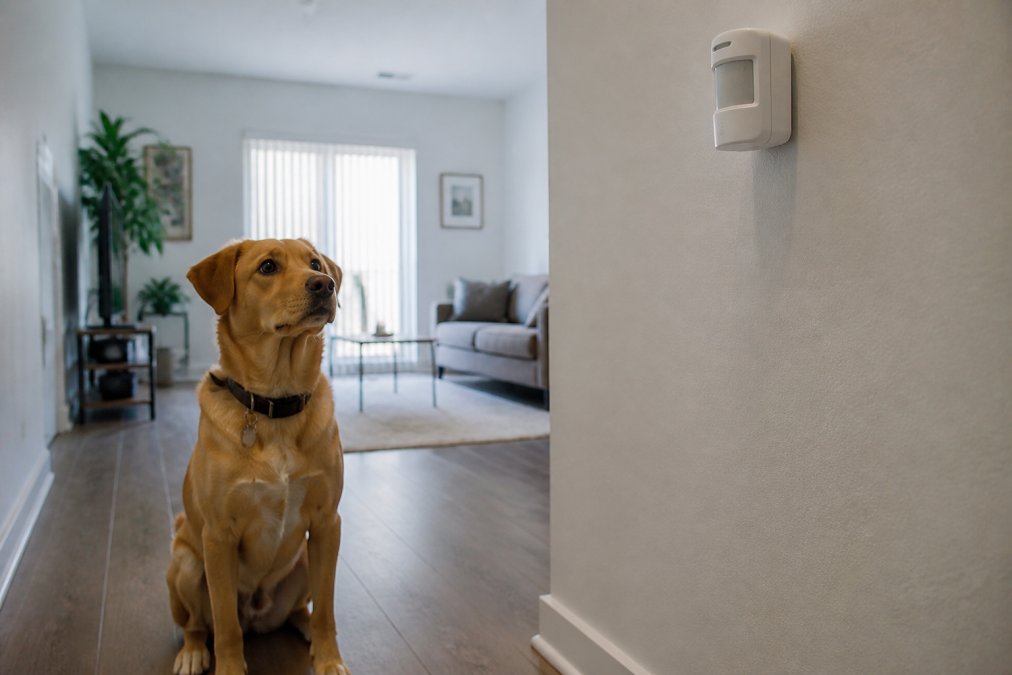
Pet-friendly motion detection is essential if you have animals. Standard motion sensors trigger false alarms from dogs and cats. Most systems offer pet immunity settings that adjust sensitivity or create zones ignoring motion below a certain height. Test pet immunity before relying on it: set the detector to pet-immune mode, walk your pet past it to confirm no alert, then walk past yourself to confirm it does trigger.
Cellular backup matters less in apartments than houses. You have Wi-Fi, and most apartments have stable internet. But if your building has frequent outages, cellular backup through a paid subscription keeps your system connected.
Apartment security doesn't require expensive systems or long-term contracts. The five systems listed above all offer month-to-month flexibility, renter-friendly installation, and real protection. Whether you choose professional monitoring or self-monitoring, wireless sensors or video doorbells, find a system that fits your lease, Wi-Fi situation, and peace of mind. Start with one option, test it for a month, and expand if needed. Your security shouldn't wait for a lease to end.
Frequently Asked Questions
Q: What is the best affordable security system for an apartment?
A: The best choice depends on your priorities. Ring Alarm offers expandable DIY protection starting at $199.99, while Wyze Home Monitoring provides professional monitoring for just $9.99/month. Abode gives you free self-monitoring with optional professional plans. All three are renter-friendly, require no long-term contracts, and use wireless sensors that need no drilling. Compare your needs for mobile alerts, remote access, and smart home integration to pick the right fit.
Q: Can I install a security system without landlord permission in an apartment?
A: Most renter-friendly systems like Ring, Wyze, Abode, and SimpliSafe use wireless sensors and no-drilling installation, which many landlords allow. However, your lease may restrict modifications or require written approval. Check your lease for security system clauses and contact your landlord before purchasing. No-contract systems let you remove equipment when you move, making them lower-risk for landlords and tenants alike.
Q: What is the best security system without a monthly fee?
A: Abode Security Kit offers genuinely free self-monitoring with app control and push notifications. You get entry delay, panic button, and siren features at no cost. TP-Link Kasa Spot provides free local recording and motion detection. SimpliSafe's free tier is limited but available. If you want professional monitoring, Wyze's $9.99/month plan is among the most affordable options available, while others start around $15-25 monthly.
Q: Do I need professional monitoring or can I self-monitor my apartment security system?
A: Self-monitoring works well if you're home frequently and can respond to alerts quickly. Abode and some SimpliSafe plans offer free or low-cost self-monitoring with mobile app notifications and two-way audio. Professional monitoring through services like Noonlight (Wyze) or Brinks (SimpliSafe) costs $8-25/month but dispatches emergency responders if you can't respond. Choose based on your schedule and comfort level handling alerts.
This article was written using GrandRanker