

Table of Contents
- Key Differences Between Doorbell and Security Cameras
- Field of View and Coverage Area
- Installation Requirements and Power Sources
- Best Budget Smart Home Security Cameras for Home Surveillance
- Best Practices for Home Surveillance Placement
- Costs, Subscriptions, and Long-Term Ownership
- Which Should You Choose?
Last Updated: August 24, 2026
Key Differences Between Doorbell and Security Cameras
A doorbell camera focuses on your entryway, capturing visitors head-to-toe with a vertical field of view optimized for seeing faces and packages. A security camera monitors a broader area, driveway, yard, or side of house, with a wider horizontal field of view designed for perimeter coverage.
Doorbell cameras are built for identification and interaction: see who's at your door, speak to them, and verify packages. Security cameras are built for surveillance and deterrence: record activity across a wider zone and detect motion in areas where you're not physically present.
Most homeowners use them together. A doorbell camera handles your front entrance with precision. A security camera or two covers blind spots: the side yard, driveway, or back patio. This combination gives comprehensive coverage without installing cameras everywhere.
Field of View and Coverage Area
Doorbell cameras typically offer a vertical 1:1 aspect ratio, letting you see a visitor from head to toe while keeping the frame tight on your entryway. The Google Nest Doorbell (battery) uses this vertical format to capture people and packages clearly without wasting pixels on empty sky or ground.
Security cameras prioritize horizontal coverage with a traditional 16:9 or 4:3 aspect ratio, giving you a wider field of view to monitor driveways, yards, or side passages. The Wyze Cam v3 offers 1080p HD video across a wider horizontal plane, letting you catch motion across a larger area.
If someone walks past your driveway, a doorbell camera might miss them entirely because they're outside its narrow vertical frame. A security camera catches them because it's watching the wider space. Conversely, if you want to see a visitor's facial expression or read a package label, the doorbell's taller frame gives you better detail.
Doorbell cameras are mounted at eye level on your door frame, typically 3-5 feet high, ideal for capturing faces (nist.gov). Security cameras are often mounted higher on eaves or corners, giving them a commanding view of a larger perimeter but sacrificing close-up detail. The Arlo Essential Video Doorbell Wire-Free uses a 180-degree diagonal field of view with its 1:1 aspect ratio to deliver exceptional head-to-toe coverage while capturing some context around the entryway.
Installation Requirements and Power Sources
Doorbell cameras are designed for simplicity, most are battery-powered and can be mounted in minutes with basic tools. The Google Nest Doorbell (battery) and Arlo Essential Video Doorbell Wire-Free both offer battery operation, requiring no electrical work.
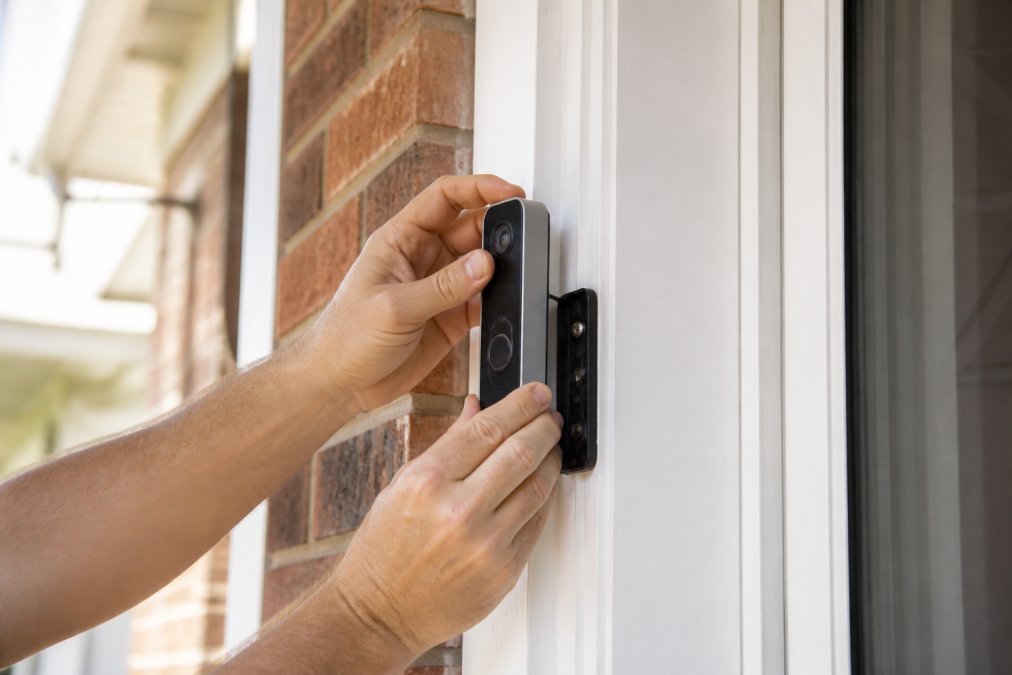
Battery-powered doorbell cameras typically need recharging every 2-6 months depending on activity level (peer-reviewed research). The trade-off is convenience: no wiring, but you must remember to charge them.
Security cameras split into two camps: hardwired and battery-powered. Hardwired cameras like the Wyze Cam v3 plug into outdoor power adapters, never losing power but requiring cable runs to your installation location. Battery-powered security cameras like the Google Nest Cam (battery) offer flexibility without electrical work, but face the same recharging cycle as doorbell cameras.
Power over Ethernet (PoE) is another option for hardwired security cameras, running a single cable that delivers both power and data. This is cleaner and more reliable but requires professional installation or advanced DIY skills.
Weather resistance matters too. Doorbell cameras are protected by your door frame overhang. Security cameras mounted on eaves or corners need strong weatherproofing. The Wyze Cam v3 carries an IP65 rating, resisting dust and water jets (fcc.gov). Check the weatherproofing rating before buying, it determines how long your camera lasts outdoors.
Doorbell cameras work best mounted at 48-60 inches high on your door frame. Security cameras perform better mounted 8-12 feet high on corners or eaves, giving them a commanding view while staying out of reach.
Best Budget Smart Home Security Cameras for Home Surveillance
The Wyze Cam v3 is the clear winner for security cameras at under $60, delivering 1080p HD video with color night vision, a feature most competitors charge double for. It's wired, so you won't worry about battery drain, and it offers both local storage via microSD card and free 12-second cloud clips with 14-day history. Some advanced detection features require a Cam Plus subscription, but basic motion detection works free.
The Google Nest Cam (battery) costs more but offers flexibility, working indoors or outdoors on battery with intelligent alerts for people, animals, and vehicles included. Three hours of free event video history comes standard; extended history requires a Google Home Premium subscription.
For doorbell cameras on a budget, the Google Nest Doorbell (battery) and Arlo Essential Video Doorbell Wire-Free both cost around $180. The Nest Doorbell's vertical 1:1 aspect ratio excels at capturing faces and packages. The Arlo Essential offers a wider 180-degree field of view, giving you more context around your entryway.
The Daily Drop by Ed Rivera regularly stocks budget-friendly smart home cameras and doorbell options. Pricing and availability change frequently, so check back often for deals. Bulk pricing is available if you're outfitting multiple properties.
| Camera Type | Best Budget Pick | Starting Price | Key Feature | Best For |
|---|---|---|---|---|
| Security Camera | Wyze Cam v3 | $55.99 | Color night vision | Wired outdoor monitoring |
| Security Camera | Google Nest Cam (battery) | $179.99 | Flexible placement | Wireless perimeter coverage |
| Doorbell Camera | Google Nest Doorbell (battery) | $179.99 | Vertical 1:1 aspect ratio | Entryway identification |
| Doorbell Camera | Arlo Essential Video Doorbell | $199.99 | 180-degree field of view | Wide entryway coverage |
Best Practices for Home Surveillance Placement
Mount a doorbell camera 48-60 inches high on your door frame, centered on the entrance. This height captures faces clearly and lets you read package labels. Avoid mounting too high, you'll lose facial detail. Avoid too low, the angle becomes unflattering and misses faces.
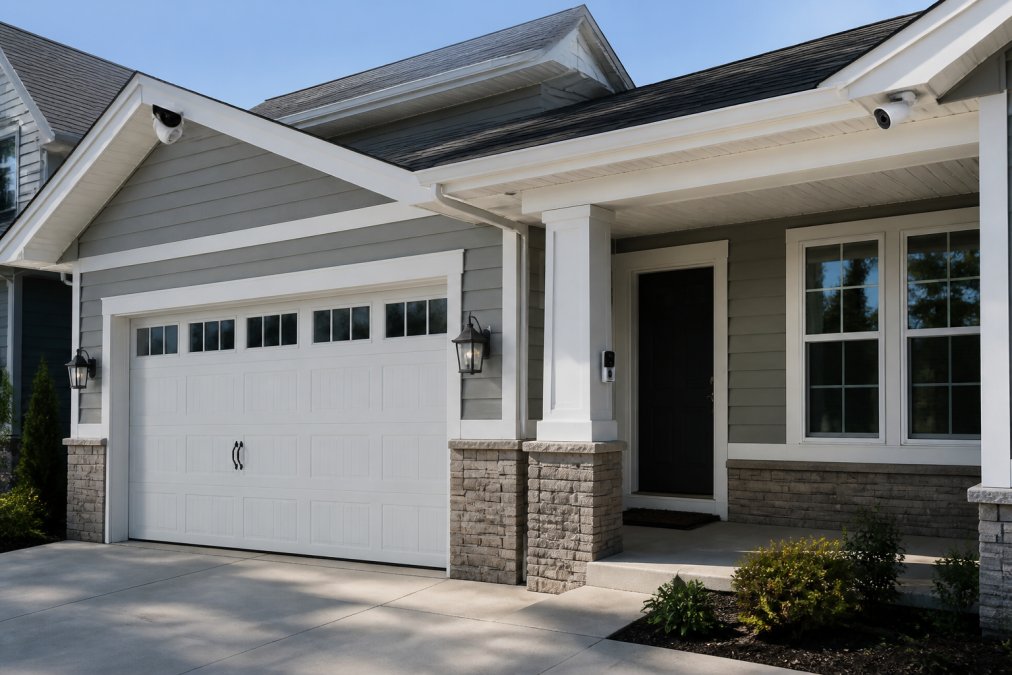
For security cameras covering larger areas, mount them 8-12 feet high on corners or eaves. This elevation gives you a commanding view of driveways, yards, and property lines while keeping cameras out of reach.
Avoid pointing cameras directly into bright light sources, windows, streetlights, or the sun. Backlighting washes out video quality and confuses motion detection. Position cameras so light comes from the side or behind them.
Consider your Wi-Fi signal strength. Cameras far from your router may struggle with connectivity, causing dropped frames or delayed alerts. Test signal strength before final installation, or add a Wi-Fi extender or mesh network to ensure reliable coverage.
Most modern cameras let you define motion detection zones, areas where motion triggers alerts. Set zones to cover entry points and high-traffic areas while excluding trees, streets, or areas with constant motion. This reduces false alerts and keeps notifications relevant.
Many cameras let you mask certain areas, your neighbor's yard, a street, or a window, to prevent recording those spaces. This respects privacy boundaries and reduces unnecessary footage.
Test your camera angles before final mounting using your smartphone to preview what each camera will see. A small angle change can mean the difference between capturing a face and capturing only a shoulder.
Costs, Subscriptions, and Long-Term Ownership
Doorbell and security cameras typically cost between $55 and $200 for hardware. The Wyze Cam v3 starts under $60. Google Nest and Arlo products run $179-$200. These are one-time purchases.
Most smart home cameras involve ongoing subscription fees for advanced features. Google Home Premium adds extended video history, familiar face alerts, and advanced detection. Arlo Secure enables smart alerts for people, packages, animals, and vehicles. Wyze Cam Plus adds person detection. Many offer free basic plans with limited history.
Local storage via microSD card eliminates subscription costs for some features. The Wyze Cam v3 supports microSD cards, letting you store video locally without paying for cloud storage. Cloud storage is more convenient but costs money.
Bandwidth usage is a hidden cost many overlook. Multiple cameras streaming simultaneously can congest your home Wi-Fi network. If your internet plan has data caps, streaming multiple 1080p cameras continuously could push you over limits.
Battery-powered doorbell and security cameras need recharging every 2-6 months depending on activity. This isn't a direct dollar cost, but it's time and effort. Hardwired cameras eliminate this hassle but require electrical work upfront.
Long-term ownership includes potential repair or replacement. Weatherproofing degrades over time. Batteries lose capacity. Budget for replacement or repair costs over 3-5 years of ownership.
The Daily Drop by Ed Rivera offers competitive pricing on smart home cameras and doorbells. Visit the site for up-to-date quotes. Bulk pricing is available for customers outfitting multiple properties or rental units.
Which Should You Choose?
Choose a doorbell camera if your priority is identifying who's at your door and communicating with them. You want to see package deliveries, verify visitors, and speak to people remotely. A doorbell camera's vertical field of view and head-to-toe capture make it ideal for this use case.
Choose a security camera if you need to monitor larger areas: driveways, yards, side passages, or perimeter coverage. You want motion detection across a wider zone and continuous recording of activity.
Choose both if you want comprehensive protection. A doorbell camera handles your entryway with precision. One or two security cameras cover blind spots and perimeter areas. This combination is more effective than either alone and costs less than you might expect.
Consider your installation constraints. Battery-powered cameras are simpler but require recharging. Hardwired cameras are more reliable but need electrical work or outdoor power adapters. If you rent or prefer not to drill holes, battery-powered models are the answer.
Think about your smart home ecosystem. Google Nest cameras integrate seamlessly with Google Assistant and Home devices. Arlo cameras work with Amazon Alexa. Wyze cameras support both. Choose cameras that match your existing setup to avoid compatibility headaches.
Budget matters too. The Wyze Cam v3 delivers exceptional value for outdoor security monitoring. Google Nest and Arlo doorbells cost more but offer premium features and reliability. The Daily Drop by Ed Rivera helps you find the right balance between features and price. Check back often, inventory and deals change regularly, and bulk pricing is available for larger orders.
Choosing between a doorbell camera and a security camera doesn't have to be complicated. Doorbell cameras solve one problem exceptionally well: seeing who's at your door. Security cameras solve another: monitoring larger areas. Most homes need both. At The Daily Drop by Ed Rivera, we stock budget-friendly options from trusted brands like Google Nest, Wyze, and Arlo. Visit our site to find current deals on smart home cameras and doorbell options. Bulk pricing is available if you're outfitting multiple properties. New deals are added regularly, so check back often for the best prices.
Frequently Asked Questions
Q: Is a security camera better than a doorbell camera for home protection?
A: Neither is universally better, they serve different purposes. Doorbell cameras excel at monitoring your entryway and identifying visitors and packages with a vertical field of view. Security cameras provide broader coverage of your property, driveways, and yard. Most homes benefit from both: a doorbell camera for entry monitoring and security cameras for perimeter coverage. Your choice depends on what areas you need to monitor and your budget.
Q: Can a doorbell camera replace a full home security camera system?
A: A doorbell camera can cover your front entrance effectively, but it cannot replace a full security camera system. Doorbell cameras focus on a narrow entry area, while security cameras provide wider field of view and can monitor multiple zones like backyards, driveways, and side yards. For comprehensive home surveillance, combine a doorbell camera with additional security cameras positioned around your property perimeter.
Q: What are the main differences in installation for doorbell vs. security cameras?
A: Doorbell cameras replace or mount near your existing doorbell and can be battery-powered or hardwired. Security cameras require weatherproofing, mounting hardware, and power sources (wired to outlets or battery-powered). Wired security cameras need power cables run to each unit, while wireless options offer flexibility but require regular battery charging or maintenance. Doorbell installation is typically simpler and faster than setting up multiple security cameras around your property.
Q: Do I need a subscription for both doorbell and security cameras?
A: Both types offer free tiers with basic features like live streaming and motion alerts. However, advanced features, such as extended video history, person or package detection, and cloud storage, typically require subscriptions. Costs vary by brand and range from $3 to $20 monthly per device or subscription plan. Local storage via microSD cards can reduce subscription needs if you prefer to store footage locally instead of in the cloud.
This article was written using GrandRanker